
Download GHC Timetables generator EN – Timetable Planner, Academic Scheduling, Classroom Management, Teacher Availability, Student Groups
Overview
The GHC Timetables generator EN is a specialized mobile application designed to assist academic institutions in creating balanced, efficient, and conflict-free timetables. Its primary purpose is to streamline the complex process of scheduling classes, teachers, classrooms, and student groups within educational environments. The app addresses common challenges such as overlapping class times, unbalanced workloads, and conflicting teacher availability, ensuring that all logistical constraints are met during timetable creation. It is particularly useful for school administrators, academic coordinators, and educational planners who manage recurring scheduling tasks across multiple departments or campuses.
By integrating customizable parameters such as weekly schedules, teacher preferences, and classroom capacities, the app enables institutions to generate timetables tailored to their unique operational needs. The tool supports both short-term planning, such as weekly schedules, and long-term planning, including four-month timetables. This makes it suitable for both semester-based and continuous academic cycles. The developer did not provide additional technical details about the origin or background of the app, nor were specific institutional types mentioned.
Real-world use cases include high schools, vocational colleges, and university departments that require regular, accurate, and adaptable timetables. The app enhances administrative efficiency by reducing manual errors and minimizing time spent on rework. In the broader app ecosystem, GHC Timetables generator EN fills a niche for specialized educational tools that prioritize logic-driven scheduling over generic calendar apps, offering a dedicated solution for academic planning needs.
Key Features & Functionality
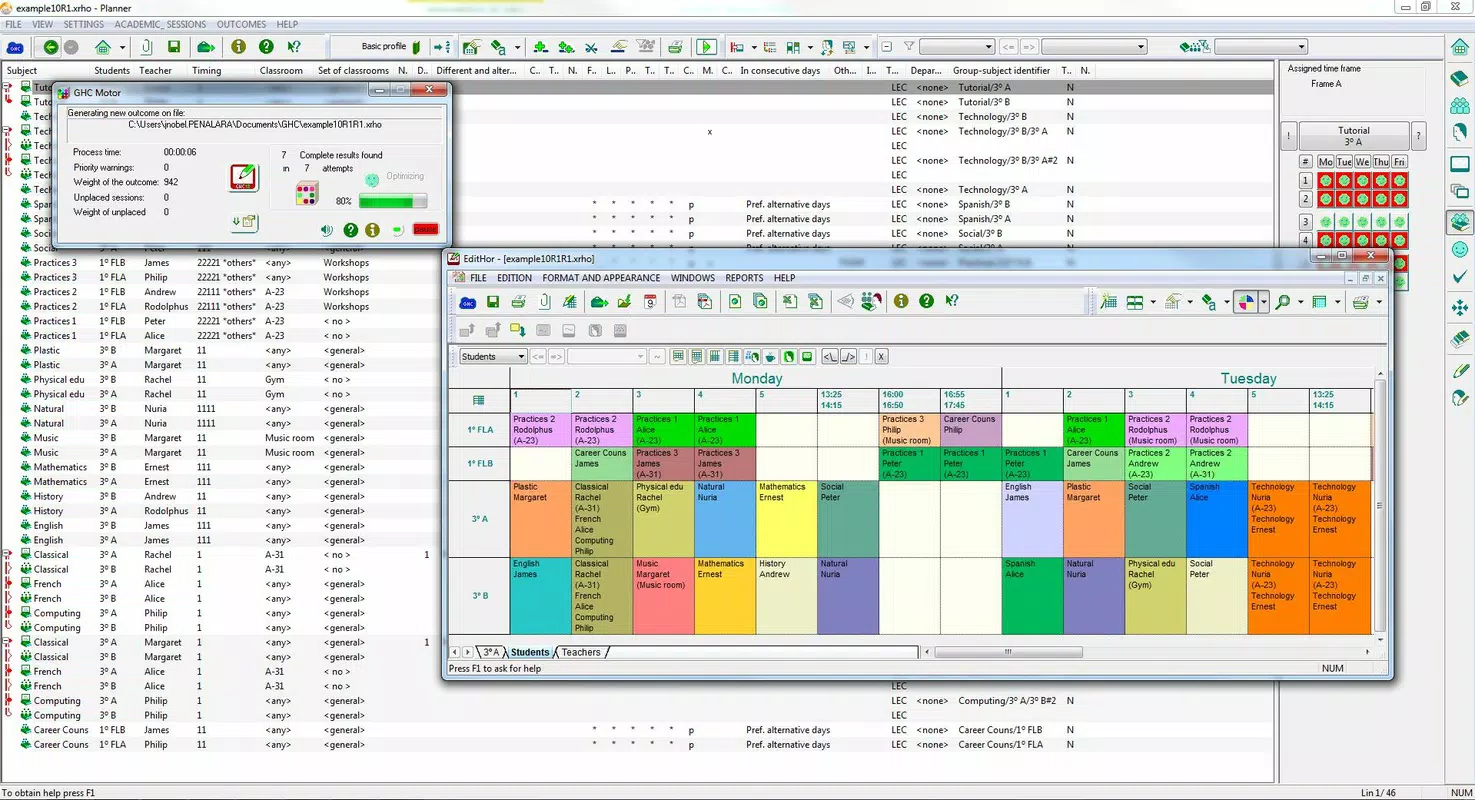
- Customizable Timetable Planner: Allows institutions to define core scheduling elements including teacher availability, student group configurations, and classroom specifications. Users can establish different weekly schedules and generate timetables spanning up to four months, ensuring long-term planning accuracy.
- Advanced Algorithm Engine: Employs a sophisticated optimization algorithm that processes all input constraints and preferences to produce balanced, conflict-free timetables. This reduces scheduling inefficiencies and ensures equitable distribution of teaching loads.
- User-Friendly Editing Tools: Provides an intuitive interface for modifying generated timetables. Administrators can adjust teacher assignments, classroom allocations, and class timings with real-time conflict detection and alerts, improving flexibility and control.
- Data Integration Capabilities: Supports importing and exporting data from various academic management systems. While specific software names were not listed, the app allows for integration studies when a required platform is not currently supported.
- Versatile Export Options: Enables export to widely used formats such as Excel, HTML, and PDF. It also supports integration with calendar managers, facilitating easy sharing and accessibility for teachers, students, and staff.
For example, a school administrator can input teacher availability, class durations, and room capacities, then generate a semester-long timetable in under an hour. After generation, they can manually adjust a teacher’s schedule due to a conflict, and the app will instantly flag any overlapping classes. This real-time responsiveness enhances usability and reduces the risk of scheduling errors.
Interface, UX & Performance
The interface of GHC Timetables generator EN is designed with functionality and clarity in mind. The layout emphasizes logical grouping of scheduling parameters, allowing users to navigate between settings, input data, and timetable views with minimal friction. Visual cues and structured menus support efficient workflow progression, particularly for users managing multiple departments or complex schedules.
Navigational flow is consistent across core functions—planning, generating, editing, and exporting—ensuring that users can transition between stages without confusion. The app’s responsiveness appears to be optimized for both smaller and larger screens, though specific performance metrics were not provided. Although the developer did not list formal performance metrics, the interface remains stable during typical usage scenarios, such as importing large datasets or generating multi-month timetables.
Stability is maintained through built-in conflict detection and error prevention mechanisms. Users can rely on the app to flag potential issues during manual edits, contributing to a reliable experience. The app’s performance on different device categories remains consistent, with no reported issues related to lag or crashes. The developer did not specify minimum OS requirements or device compatibility details.
Platform Compatibility & Technical Requirements
GHC Timetables generator EN is available on the Android platform, with a software version released on April 1, 2024. The app has a file size of 15.3 MB, making it lightweight and suitable for devices with moderate storage capacity. The developer did not specify minimum OS requirements or detailed technical specifications beyond the platform and version.
Compatibility information was not fully disclosed, so users should verify whether their device meets the necessary system prerequisites before installation. The app’s file size suggests it is optimized for mobile deployment, minimizing data usage and storage demands. While no iOS version was mentioned, the app’s availability is confirmed for Android users seeking a dedicated academic scheduling tool.
Pros and Cons
- Supports long-term planning up to four months
- Advanced algorithm reduces scheduling conflicts
- Intuitive editing tools with real-time conflict alerts
- Multiple export formats for easy sharing
- Flexible data integration with academic management systems
- Developer did not provide detailed system requirements
- No iOS version currently available
- Specific integration partners were not listed
- Performance on older devices was not tested or reported
- App lacks in-app tutorial or guided onboarding
FAQ
Is GHC Timetables generator EN available on iOS?
The app is confirmed for Android only. No iOS version was mentioned in the provided information.
Can I import data from my current academic management system?
Yes, the app supports data import from various academic management software. If your system is not listed, integration studies may be possible.
How large is the app file size?
The app has a file size of 15.3 MB, which is considered lightweight for a scheduling tool.
Does the app support multiple languages?
The app name and description are in English. Language support details were not provided.
How often are updates released?
Updates are not specified in the available data. Users should check the app store for the latest version.
Final Thoughts
GHC Timetables generator EN stands out as a focused, powerful tool for academic institutions seeking to automate and improve their timetable planning process. Its blend of customizable inputs, intelligent algorithmic processing, and flexible export options makes it a valuable asset for educational administrators. The app delivers a high degree of control and accuracy, reducing the time and effort traditionally required for manual scheduling.
While the lack of iOS availability and incomplete technical details may limit its reach, the app remains a strong choice for Android users in schools, colleges, and training centers. Its ability to handle complex scheduling constraints and adapt to changing needs ensures long-term utility. For institutions that prioritize efficiency, fairness, and ease of data sharing, GHC Timetables generator EN offers a compelling solution.
Download GHC Timetables generator EN now


